
Fresh Projects is a UK-based software platform designed for architects, engineers, and other built-environment professionals to manage financial aspects of their projects. It helps teams track fees, timesheets, expenses, billing, and overall profitability to keep projects on budget and profitable. The platform also centralises project data, streamlines administrative tasks, and offers mobile app support for easy access and updates.
1a Colinette Road
London
SW15 6QG
© 2026 Fresh Projects
Product
Fresh Projects is a UK-based software platform designed for architects, engineers, and other built-environment professionals to manage financial aspects of their projects. It helps teams track fees, timesheets, expenses, billing, and overall profitability to keep projects on budget and profitable. The platform also centralises project data, streamlines administrative tasks, and offers mobile app support for easy access and updates.
1a Colinette Road
London
SW15 6QG
© 2026 Fresh Projects
Product
Spreadsheets in A&E Firms: Usage, Key Features, and Underappreciated Gems
Spreadsheets in A&E Firms: Usage, Key Features, and Underappreciated Gems
Spreadsheets in A&E Firms: Usage, Key Features, and Underappreciated Gems
Reading Time:
Reading Time:
14
14
minute(s)
minute(s)

Spreadsheets have long been an indispensable tool in architecture and engineering practice. From tracking project budgets to organising complex building data, many A&E firms rely on spreadsheet software daily. Excel is so entrenched that most architects use it regularly, despite few having formal training in it. Surveys and industry reports reinforce this heavy reliance. One recurring observation from across the construction sector is that the primary business system for managing projects is still often Microsoft Excel. Even as modern, specialised tools emerge, spreadsheets remain ubiquitous due to their flexibility, familiarity, and low cost.
Whether you are an operations manager tracking fees, a project lead managing resourcing, or a principal juggling fee proposals and business development, spreadsheets likely play a central role in how your firm runs. This guide is written for A&E professionals who manage the commercial side of projects and need tools that support clear, consistent decision-making across time, cost, and delivery.
However, not all spreadsheet platforms are equal and the way spreadsheets behave in a larger firm is very different to a five-person studio. This article examines the prominent spreadsheet software used in A&E firms, chiefly Microsoft Excel, Google Sheets, and Apple Numbers (with a look at others like Smartsheet), and analyses the features A&E professionals find most useful. We also highlight some powerful but underutilised features that can boost productivity and reduce risk in real-world A&E workflows.
Common spreadsheet software in A&E
Microsoft Excel: the industry standard
By far the most widely used spreadsheet tool in A&E is Microsoft Excel. Its dominance is well-documented, with industry commentary repeatedly noting that Excel often remains the primary system used to manage project information. Its popularity stems from a combination of power and familiarity: nearly everyone in an architecture or engineering office has Excel and knows the basics.
Excel is used across almost every business function in architecture and engineering, including planning, contracts, budgeting, design calculations, quantity take-offs, scheduling, and reporting. In practices specifically, Excel often underpins project finance management (fee budgets, expense tracking), resource planning, and operational reporting.
Key reasons for Excel’s entrenched use in A&E include:
Flexibility and “programming” capabilities
Perhaps Excel’s greatest strength is its flexibility. Users can set up nearly any structure or process they need, from a simple fee schedule to a multi-sheet project workbook, without requiring IT support. Advanced users tap into Macros and VBA scripting to automate repetitive tasks. For example, a macro that generates a fee report, consolidates timesheets, or batch-updates a register can save hours of manual work. This do-it-yourself programmability lets teams build custom tools that fit their practice.Universality
Excel’s format is a lingua franca. Files can be shared easily internally and externally, and most clients, consultants, and contractors can open and understand them. That compatibility is a big win on multi-party projects.Powerful calculation features
Excel offers an extensive library of formulas and functions beyond basic sums. Many teams use lookup functions, logical tests, and structured calculations to support cost planning, fee modelling, and financial analysis.Pivot tables and reporting
PivotTables are prized for summarising large datasets, such as compiling timesheet hours or cost data across multiple projects into meaningful insights. They help reveal trends, including which stages consume the most hours, where drift is happening, and which teams or project types are consistently underperforming financially.Charts and visualisation
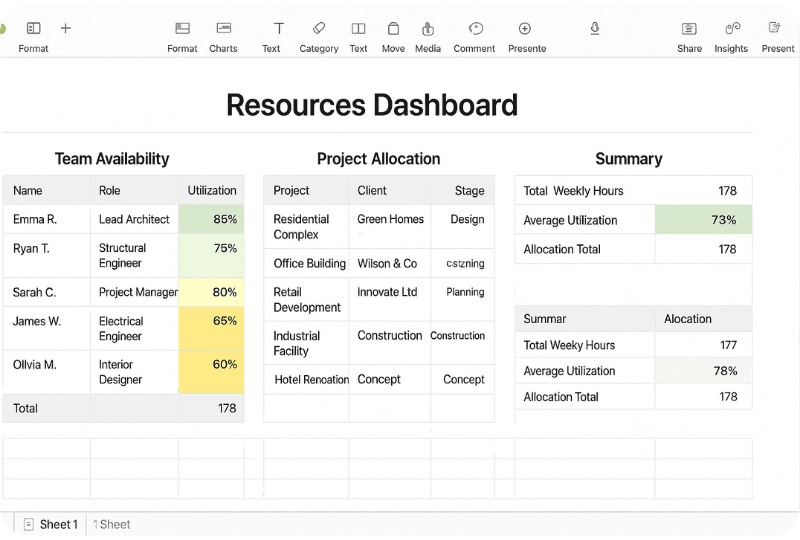
Excel is frequently used to visualise cash flow curves, resource allocation, project progress, and financial performance. Many firms build internal dashboards using tables and charts to monitor project health and flag problems early.
It is no surprise Excel is deeply ingrained in A&E workflows. Even many larger practices still rely on spreadsheets for “administrative stuff” alongside other systems, because spreadsheets are fast, adaptable, and everyone already uses them.
But the very thing that makes Excel powerful is also what makes it risky at scale. In larger firms, the challenge is not whether Excel can do the job. It is whether a spreadsheet-based approach can reliably produce a single version of the truth when dozens of people are touching the data, across multiple studios, projects, and reporting cycles.
Google Sheets: cloud collaboration
Google Sheets is the other major player, increasingly used especially by distributed teams, multi-office practices, and functions that need rapid collaboration.
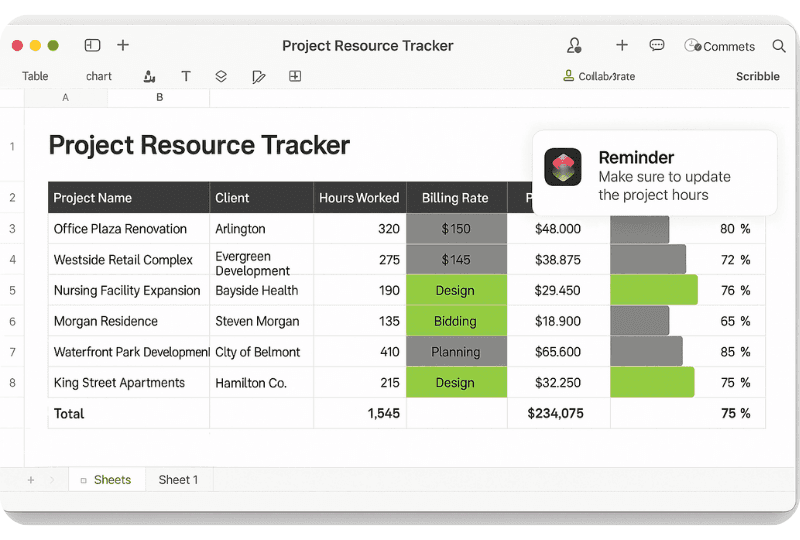
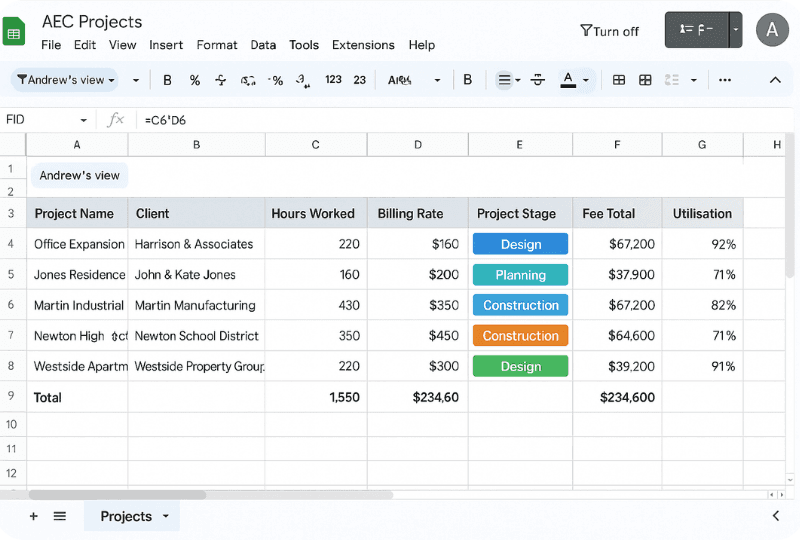
Sheets provides spreadsheet functionality similar to Excel but in a cloud-based, browser interface. Its killer feature is real-time collaboration: multiple team members can edit a budget, resourcing plan, or tracker simultaneously and see changes live. Combined with built-in version history, this makes Sheets excellent for scenarios where many contributors input data.
Google Sheets adoption has grown particularly for:
collaborative budget and fee trackers
resourcing and availability sheets
programme logs and coordination trackers
time tracking templates and simple internal reporting
In terms of features, Sheets offers a robust set of functions (with equivalents to most Excel formulas), plus unique capabilities like easy integration with Google Forms and Google Apps Script for automation.
However, Sheets does have limitations for A&E use: very large datasets and heavy calculations can bog it down, and certain advanced Excel features are less powerful or unavailable. Despite that, for many A&E teams the trade-off is worth it for collaboration and access.
Apple Numbers: niche use in Mac-centric circles
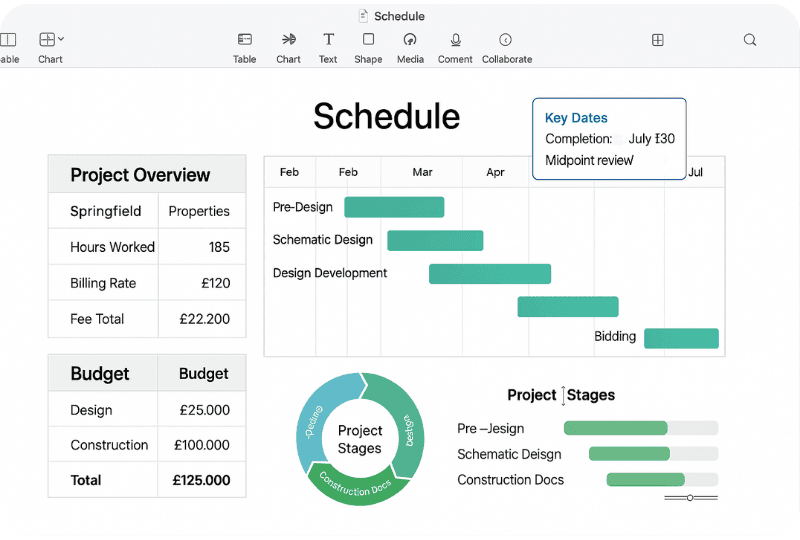
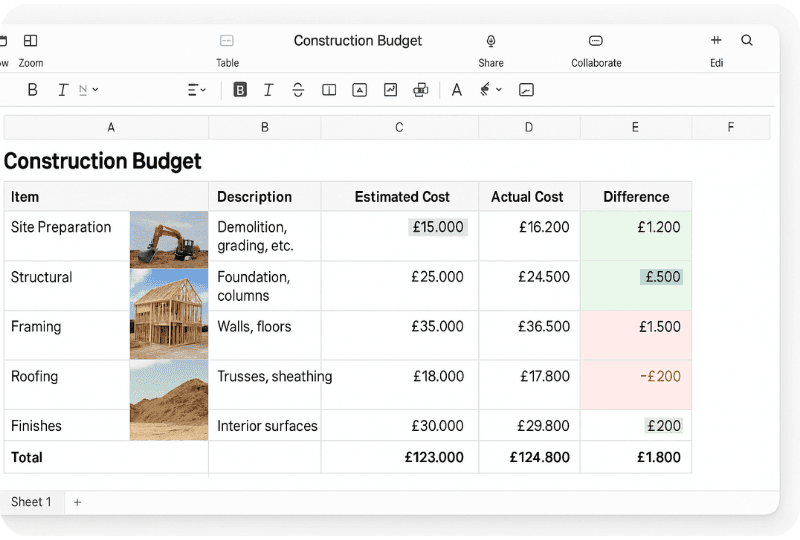
Apple Numbers is far less common than Excel or Sheets, but you still see it in small Mac-first studios or for lightweight internal work. Numbers is known for a clean interface and presentation-ready tables and charts, which can suit fee proposals or client-facing schedules.
That said, Numbers lacks many advanced features and cross-platform compatibility. Collaboration via iCloud is limited compared to Google’s real-time editing, and most larger A&E firms standardise on Excel or cloud-based tools. Numbers remains a niche rather than a firm-wide standard.
Other spreadsheet-like tools: Smartsheet and beyond
Aside from traditional spreadsheets, some firms use spreadsheet-like platforms designed for project delivery.
A notable example is Smartsheet, a cloud platform with a spreadsheet interface plus project scheduling features like Gantt charts, dependencies, and automation. This appeals to project teams because it combines familiar editing with more structured delivery controls and collaboration.
Other tools sometimes used include:
Airtable (database-spreadsheet hybrid) for structured data like contacts, assets, pipelines, and project metadata
LibreOffice Calc as an open-source alternative
COBie workbooks and other spreadsheet-based data standards that interface with BIM and asset information
These tools do not remove spreadsheets from the equation. They usually extend them, or replace only one part of the workflow.
The spreadsheet reality in larger A&E firms
Spreadsheets are not just used because they are cheap. They are used because they are fast.
But in a larger practice, the core problem is rarely calculation. It is governance.
As a firm grows, spreadsheets tend to multiply:
one spreadsheet per project, per team, per PM
a different budget template by studio
separate trackers for timesheets, expenses, invoices, variations
monthly reporting packs built from exports and manual consolidation
The moment you have multiple copies of the same truth, you get friction:
reporting takes days, not hours
numbers change depending on whose spreadsheet you open
project teams lose trust in the metrics
directors get performance insight too late to intervene
This is why “single version of the truth” becomes a defining operational challenge in larger firms. The spreadsheet itself is not the enemy. The lack of shared structure, governance, and automation is.
With that context, here are the features A&E teams rely on most, followed by the underappreciated features that can make spreadsheets more resilient.
Most-used features in A&E spreadsheets
Mathematical and database functions
At their heart, spreadsheets are calculation tools. A&E teams use formulas to automate calculations that would otherwise be time-consuming or prone to error.
Common basics include SUM and AVERAGE, but many users quickly adopt more advanced formulas, including:
lookup functions (VLOOKUP, XLOOKUP, INDEX/MATCH) to pull rates, stage budgets, or role costs into project models
logical functions (IF, AND, OR) to flag overspend or missing data
date functions to support programme and billing logic
These functions turn a spreadsheet into a lightweight database and make fee models and cost plans much more scalable.
Pivot tables and data summaries
When dealing with large datasets, pivot tables are a go-to feature.
In A&E firms, they are often used for:
summarising timesheet data by person, project, stage, and task
highlighting where fee burn is happening fastest
benchmarking stage performance across project types
consolidating multiple cost lines into a high-level financial view
Pivot tables are often the fastest way to go from raw data to insight.
Conditional formatting and data visualisation
Conditional formatting is a simple feature that becomes powerful when used consistently.
Typical A&E use cases include:
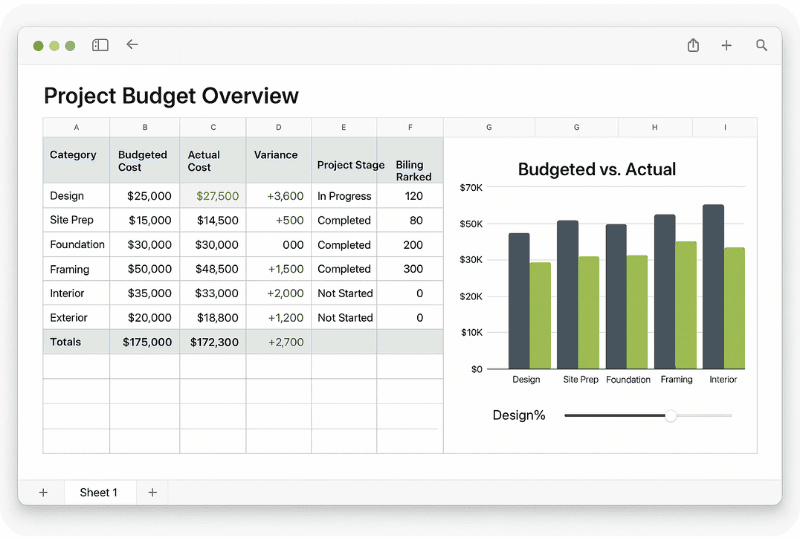
highlighting budget lines that exceed limits
flagging overdue tasks or missing timesheets
surfacing risk weeks in cash flow forecasts
showing phase or stage burn visually so teams can read a model quickly
These visual signals reduce reliance on manual checking and help teams spot problems earlier.
Project scheduling and Gantt charts
Many A&E teams still use spreadsheets for scheduling phases, tasks, and deliverables, even though dedicated scheduling tools exist.
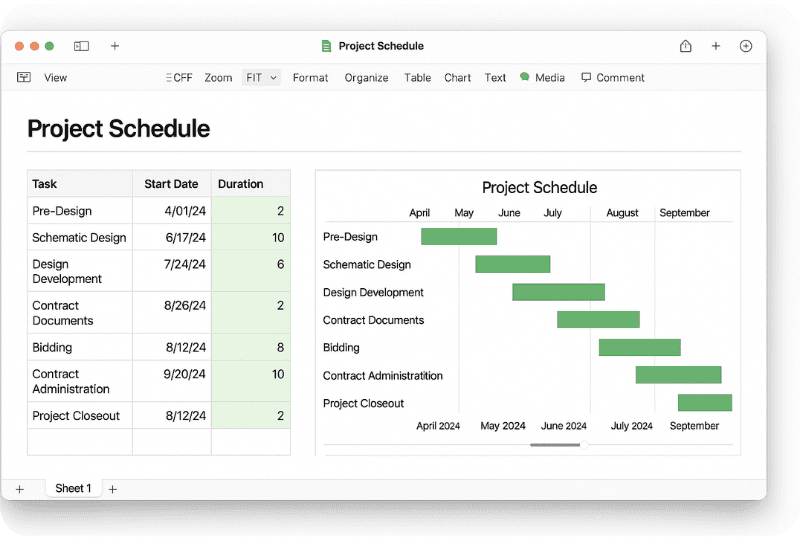
Excel Gantt charts are often built with templates and conditional formatting. They are not dependency-driven like dedicated tools, but they are easy to share and quick to update, which is why they persist.
Smartsheet sits here too, offering the same spreadsheet comfort with more delivery structure.
Collaboration and sharing
Collaboration is one of the most valued aspects of spreadsheets, but it is also one of the biggest risk areas in larger firms.
Google Sheets excels at real-time editing and version history. Excel now supports co-authoring when files sit in OneDrive or SharePoint. These capabilities can reduce the version-sprawl problem, but only if the firm standardises how files are stored and used.
Templates and reusability
Templates are one of the reasons spreadsheets remain dominant.
Common A&E templates include:
fee calculation worksheets
project budgets and stage burn trackers
timesheets and utilisation models
cash flow forecasts
drawing registers and issue trackers
Templates encode firm knowledge, reduce setup time, and help standardise basic processes, if they are governed properly.
Automation and scripting
Excel VBA and Google Apps Script can automate repetitive work, from building standard reports to formatting client-ready summaries to sending reminders.
Most firms do not fully use this capability, but where they do, the productivity gains can be significant.
Underappreciated features and hidden gems
Many A&E teams get great value from spreadsheets, but still only use a fraction of their capabilities. These features are often overlooked, yet they can dramatically reduce errors and improve consistency in larger firms.
Advanced data analysis tools (Power Query, Power Pivot)
Power Query (Get & Transform) allows users to pull data from external sources and clean, merge, and transform it automatically.
This is particularly valuable for larger firms where reporting relies on exports, for example:
pulling monthly timesheet exports into one consistent model
merging invoice data with project budgets
standardising naming and categories across multiple teams
Power Pivot extends Excel’s analytical power by letting users create relationships between tables and build more complex pivot analysis, closer to business intelligence tools.
These tools reduce manual copy and paste, which is one of the biggest sources of spreadsheet risk in larger firms.
Macros and scripting: making spreadsheets do the work
Most spreadsheet pain in A&E firms comes from repetition.
Macros can automate tasks like:
consolidating weekly time entries into a master table
producing a standard project performance pack
cleaning inconsistent naming across data sources
generating summaries for invoicing or client reporting
With better resources available today, creating basic automation is more accessible than many teams assume.
Data validation and structured data entry
In larger practices, inconsistent data entry is one of the silent killers of reporting accuracy.
Data validation helps by restricting inputs to approved values, for example:
project phase names
role titles
sector categories
studio or team labels
status tags for pipeline and programme
Using validation, dropdowns, and structured tables can transform a messy spreadsheet into a reliable dataset.
Pivot charts, slicers, and interactive dashboards
Many teams use pivot tables but stop short of making them interactive.
Pivot charts and slicers let leaders filter views quickly, for example:
by studio
by sector
by PM
by stage
by time period
This turns static reporting into a live dashboard, which is often more useful for operational decision-making.
Integration with other tools (BIM, finance, project systems)
Spreadsheets do not have to exist in isolation.
Forward-thinking teams link spreadsheets to:
BIM exports and schedules (quantities, COBie, asset data)
accounting exports for invoice reconciliation
CRM and pipeline data for forecasting
resourcing systems for capacity planning
Even a simple CSV-based workflow can reduce manual re-entry.
Co-authoring in Excel and cloud adoption
Excel co-authoring is still underused in many firms because habits have not caught up with the technology.
If a firm standardises file storage in SharePoint or OneDrive and trains teams to co-author, it can reduce:
“final_final” version sprawl
file locks
local copies of outdated budgets
confusion about which report is current
This is one of the easiest operational wins for firms that still rely heavily on Excel.
Apple Numbers specific tricks (for those who use it)
Numbers allows multiple tables on one sheet canvas, which can be useful for clean, one-page summary reports. It also supports iPhone and iPad-friendly input workflows via Apple’s ecosystem.
It remains niche, but for small Mac-first teams it can be a useful tool for presentation.
AI features in Excel and Google Sheets
Both platforms are introducing AI assistants designed to speed up formula building, analysis, and presentation.
The value of these features depends heavily on spreadsheet hygiene. AI works best when data is structured, consistent, and validated, which is a good reason to tighten spreadsheet practices now, even before AI becomes a daily habit.
Cautionary note: the limits of spreadsheets in A&E
No discussion of spreadsheet use is complete without acknowledging the pitfalls.
Human error and fragile logic
A single wrong formula can cascade into financial errors. Spreadsheets are flexible, which is also a vulnerability. Without validation, audit controls, and governance, errors can sit undetected until it is too late.
Version control and “multiple truths”
The most common failure mode in larger firms is not that spreadsheets cannot calculate. It is that they cannot easily enforce a single source of truth.
If a project budget exists in five files, the question becomes: which one is real?
Scalability and time drain
What works for a small studio often becomes a monthly reporting burden at scale. Manual consolidation and report creation becomes a hidden overhead cost.
Not fit for certain purposes
Some workflows outgrow spreadsheets, such as:
complex dependency scheduling
firm-wide CRM and pipeline management
live project financial performance monitoring across dozens of projects
Spreadsheets can still support analysis, but relying on them as a system of record is where risk increases.
Fresh Projects and spreadsheets: a complementary approach
Spreadsheets are powerful and familiar. They offer simplicity, flexibility, and low cost, which is why A&E firms use them for everything from fee proposals to tracking timesheets.
But as firms grow, the limitations of spreadsheet-based management become more visible:
manual updates
fragile formulas
siloed data across teams
reporting built from exports and consolidation
delayed insight, usually after margin has already slipped
Fresh Projects is designed to take the heavy lifting off spreadsheets while complementing existing workflows. It does not require a firm to abandon spreadsheets overnight. Instead, it helps practices graduate from spreadsheet sprawl by centralising and automating repetitive, error-prone tasks.
For example, instead of manually consolidating dozens of files to understand project performance, Fresh Projects provides visibility over fees, time, utilisation, and delivery in one place, in a way that stays current as projects evolve.
Importantly, this approach respects the reality of how A&E teams work. Spreadsheets remain useful for modelling, ad hoc analysis, and client-ready summaries. The difference is that your operational truth can sit in a system designed for consistency, permissions, and shared visibility, rather than relying on a chain of files and good intentions.
Used together, spreadsheets and Fresh Projects can reduce admin overhead, improve accuracy, and help larger firms maintain the clarity that is otherwise lost as the business becomes more complex.
In summary, spreadsheet software in A&E is here to stay. When wielded with knowledge of its best features and its limits, it remains a powerful enabler of delivery and commercial clarity. The goal is not to love or hate spreadsheets. It is to use them intentionally, strengthen them with the right features, and recognise when scale demands a more reliable single version of the truth.
Spreadsheets have long been an indispensable tool in architecture and engineering practice. From tracking project budgets to organising complex building data, many A&E firms rely on spreadsheet software daily. Excel is so entrenched that most architects use it regularly, despite few having formal training in it. Surveys and industry reports reinforce this heavy reliance. One recurring observation from across the construction sector is that the primary business system for managing projects is still often Microsoft Excel. Even as modern, specialised tools emerge, spreadsheets remain ubiquitous due to their flexibility, familiarity, and low cost.
Whether you are an operations manager tracking fees, a project lead managing resourcing, or a principal juggling fee proposals and business development, spreadsheets likely play a central role in how your firm runs. This guide is written for A&E professionals who manage the commercial side of projects and need tools that support clear, consistent decision-making across time, cost, and delivery.
However, not all spreadsheet platforms are equal and the way spreadsheets behave in a larger firm is very different to a five-person studio. This article examines the prominent spreadsheet software used in A&E firms, chiefly Microsoft Excel, Google Sheets, and Apple Numbers (with a look at others like Smartsheet), and analyses the features A&E professionals find most useful. We also highlight some powerful but underutilised features that can boost productivity and reduce risk in real-world A&E workflows.
Common spreadsheet software in A&E
Microsoft Excel: the industry standard
By far the most widely used spreadsheet tool in A&E is Microsoft Excel. Its dominance is well-documented, with industry commentary repeatedly noting that Excel often remains the primary system used to manage project information. Its popularity stems from a combination of power and familiarity: nearly everyone in an architecture or engineering office has Excel and knows the basics.
Excel is used across almost every business function in architecture and engineering, including planning, contracts, budgeting, design calculations, quantity take-offs, scheduling, and reporting. In practices specifically, Excel often underpins project finance management (fee budgets, expense tracking), resource planning, and operational reporting.
Key reasons for Excel’s entrenched use in A&E include:
Flexibility and “programming” capabilities
Perhaps Excel’s greatest strength is its flexibility. Users can set up nearly any structure or process they need, from a simple fee schedule to a multi-sheet project workbook, without requiring IT support. Advanced users tap into Macros and VBA scripting to automate repetitive tasks. For example, a macro that generates a fee report, consolidates timesheets, or batch-updates a register can save hours of manual work. This do-it-yourself programmability lets teams build custom tools that fit their practice.Universality
Excel’s format is a lingua franca. Files can be shared easily internally and externally, and most clients, consultants, and contractors can open and understand them. That compatibility is a big win on multi-party projects.Powerful calculation features
Excel offers an extensive library of formulas and functions beyond basic sums. Many teams use lookup functions, logical tests, and structured calculations to support cost planning, fee modelling, and financial analysis.Pivot tables and reporting
PivotTables are prized for summarising large datasets, such as compiling timesheet hours or cost data across multiple projects into meaningful insights. They help reveal trends, including which stages consume the most hours, where drift is happening, and which teams or project types are consistently underperforming financially.Charts and visualisation
Excel is frequently used to visualise cash flow curves, resource allocation, project progress, and financial performance. Many firms build internal dashboards using tables and charts to monitor project health and flag problems early.
It is no surprise Excel is deeply ingrained in A&E workflows. Even many larger practices still rely on spreadsheets for “administrative stuff” alongside other systems, because spreadsheets are fast, adaptable, and everyone already uses them.
But the very thing that makes Excel powerful is also what makes it risky at scale. In larger firms, the challenge is not whether Excel can do the job. It is whether a spreadsheet-based approach can reliably produce a single version of the truth when dozens of people are touching the data, across multiple studios, projects, and reporting cycles.
Google Sheets: cloud collaboration
Google Sheets is the other major player, increasingly used especially by distributed teams, multi-office practices, and functions that need rapid collaboration.
Sheets provides spreadsheet functionality similar to Excel but in a cloud-based, browser interface. Its killer feature is real-time collaboration: multiple team members can edit a budget, resourcing plan, or tracker simultaneously and see changes live. Combined with built-in version history, this makes Sheets excellent for scenarios where many contributors input data.
Google Sheets adoption has grown particularly for:
collaborative budget and fee trackers
resourcing and availability sheets
programme logs and coordination trackers
time tracking templates and simple internal reporting
In terms of features, Sheets offers a robust set of functions (with equivalents to most Excel formulas), plus unique capabilities like easy integration with Google Forms and Google Apps Script for automation.
However, Sheets does have limitations for A&E use: very large datasets and heavy calculations can bog it down, and certain advanced Excel features are less powerful or unavailable. Despite that, for many A&E teams the trade-off is worth it for collaboration and access.
Apple Numbers: niche use in Mac-centric circles
Apple Numbers is far less common than Excel or Sheets, but you still see it in small Mac-first studios or for lightweight internal work. Numbers is known for a clean interface and presentation-ready tables and charts, which can suit fee proposals or client-facing schedules.
That said, Numbers lacks many advanced features and cross-platform compatibility. Collaboration via iCloud is limited compared to Google’s real-time editing, and most larger A&E firms standardise on Excel or cloud-based tools. Numbers remains a niche rather than a firm-wide standard.
Other spreadsheet-like tools: Smartsheet and beyond
Aside from traditional spreadsheets, some firms use spreadsheet-like platforms designed for project delivery.
A notable example is Smartsheet, a cloud platform with a spreadsheet interface plus project scheduling features like Gantt charts, dependencies, and automation. This appeals to project teams because it combines familiar editing with more structured delivery controls and collaboration.
Other tools sometimes used include:
Airtable (database-spreadsheet hybrid) for structured data like contacts, assets, pipelines, and project metadata
LibreOffice Calc as an open-source alternative
COBie workbooks and other spreadsheet-based data standards that interface with BIM and asset information
These tools do not remove spreadsheets from the equation. They usually extend them, or replace only one part of the workflow.
The spreadsheet reality in larger A&E firms
Spreadsheets are not just used because they are cheap. They are used because they are fast.
But in a larger practice, the core problem is rarely calculation. It is governance.
As a firm grows, spreadsheets tend to multiply:
one spreadsheet per project, per team, per PM
a different budget template by studio
separate trackers for timesheets, expenses, invoices, variations
monthly reporting packs built from exports and manual consolidation
The moment you have multiple copies of the same truth, you get friction:
reporting takes days, not hours
numbers change depending on whose spreadsheet you open
project teams lose trust in the metrics
directors get performance insight too late to intervene
This is why “single version of the truth” becomes a defining operational challenge in larger firms. The spreadsheet itself is not the enemy. The lack of shared structure, governance, and automation is.
With that context, here are the features A&E teams rely on most, followed by the underappreciated features that can make spreadsheets more resilient.
Most-used features in A&E spreadsheets
Mathematical and database functions
At their heart, spreadsheets are calculation tools. A&E teams use formulas to automate calculations that would otherwise be time-consuming or prone to error.
Common basics include SUM and AVERAGE, but many users quickly adopt more advanced formulas, including:
lookup functions (VLOOKUP, XLOOKUP, INDEX/MATCH) to pull rates, stage budgets, or role costs into project models
logical functions (IF, AND, OR) to flag overspend or missing data
date functions to support programme and billing logic
These functions turn a spreadsheet into a lightweight database and make fee models and cost plans much more scalable.
Pivot tables and data summaries
When dealing with large datasets, pivot tables are a go-to feature.
In A&E firms, they are often used for:
summarising timesheet data by person, project, stage, and task
highlighting where fee burn is happening fastest
benchmarking stage performance across project types
consolidating multiple cost lines into a high-level financial view
Pivot tables are often the fastest way to go from raw data to insight.
Conditional formatting and data visualisation
Conditional formatting is a simple feature that becomes powerful when used consistently.
Typical A&E use cases include:
highlighting budget lines that exceed limits
flagging overdue tasks or missing timesheets
surfacing risk weeks in cash flow forecasts
showing phase or stage burn visually so teams can read a model quickly
These visual signals reduce reliance on manual checking and help teams spot problems earlier.
Project scheduling and Gantt charts
Many A&E teams still use spreadsheets for scheduling phases, tasks, and deliverables, even though dedicated scheduling tools exist.
Excel Gantt charts are often built with templates and conditional formatting. They are not dependency-driven like dedicated tools, but they are easy to share and quick to update, which is why they persist.
Smartsheet sits here too, offering the same spreadsheet comfort with more delivery structure.
Collaboration and sharing
Collaboration is one of the most valued aspects of spreadsheets, but it is also one of the biggest risk areas in larger firms.
Google Sheets excels at real-time editing and version history. Excel now supports co-authoring when files sit in OneDrive or SharePoint. These capabilities can reduce the version-sprawl problem, but only if the firm standardises how files are stored and used.
Templates and reusability
Templates are one of the reasons spreadsheets remain dominant.
Common A&E templates include:
fee calculation worksheets
project budgets and stage burn trackers
timesheets and utilisation models
cash flow forecasts
drawing registers and issue trackers
Templates encode firm knowledge, reduce setup time, and help standardise basic processes, if they are governed properly.
Automation and scripting
Excel VBA and Google Apps Script can automate repetitive work, from building standard reports to formatting client-ready summaries to sending reminders.
Most firms do not fully use this capability, but where they do, the productivity gains can be significant.
Underappreciated features and hidden gems
Many A&E teams get great value from spreadsheets, but still only use a fraction of their capabilities. These features are often overlooked, yet they can dramatically reduce errors and improve consistency in larger firms.
Advanced data analysis tools (Power Query, Power Pivot)
Power Query (Get & Transform) allows users to pull data from external sources and clean, merge, and transform it automatically.
This is particularly valuable for larger firms where reporting relies on exports, for example:
pulling monthly timesheet exports into one consistent model
merging invoice data with project budgets
standardising naming and categories across multiple teams
Power Pivot extends Excel’s analytical power by letting users create relationships between tables and build more complex pivot analysis, closer to business intelligence tools.
These tools reduce manual copy and paste, which is one of the biggest sources of spreadsheet risk in larger firms.
Macros and scripting: making spreadsheets do the work
Most spreadsheet pain in A&E firms comes from repetition.
Macros can automate tasks like:
consolidating weekly time entries into a master table
producing a standard project performance pack
cleaning inconsistent naming across data sources
generating summaries for invoicing or client reporting
With better resources available today, creating basic automation is more accessible than many teams assume.
Data validation and structured data entry
In larger practices, inconsistent data entry is one of the silent killers of reporting accuracy.
Data validation helps by restricting inputs to approved values, for example:
project phase names
role titles
sector categories
studio or team labels
status tags for pipeline and programme
Using validation, dropdowns, and structured tables can transform a messy spreadsheet into a reliable dataset.
Pivot charts, slicers, and interactive dashboards
Many teams use pivot tables but stop short of making them interactive.
Pivot charts and slicers let leaders filter views quickly, for example:
by studio
by sector
by PM
by stage
by time period
This turns static reporting into a live dashboard, which is often more useful for operational decision-making.
Integration with other tools (BIM, finance, project systems)
Spreadsheets do not have to exist in isolation.
Forward-thinking teams link spreadsheets to:
BIM exports and schedules (quantities, COBie, asset data)
accounting exports for invoice reconciliation
CRM and pipeline data for forecasting
resourcing systems for capacity planning
Even a simple CSV-based workflow can reduce manual re-entry.
Co-authoring in Excel and cloud adoption
Excel co-authoring is still underused in many firms because habits have not caught up with the technology.
If a firm standardises file storage in SharePoint or OneDrive and trains teams to co-author, it can reduce:
“final_final” version sprawl
file locks
local copies of outdated budgets
confusion about which report is current
This is one of the easiest operational wins for firms that still rely heavily on Excel.
Apple Numbers specific tricks (for those who use it)
Numbers allows multiple tables on one sheet canvas, which can be useful for clean, one-page summary reports. It also supports iPhone and iPad-friendly input workflows via Apple’s ecosystem.
It remains niche, but for small Mac-first teams it can be a useful tool for presentation.
AI features in Excel and Google Sheets
Both platforms are introducing AI assistants designed to speed up formula building, analysis, and presentation.
The value of these features depends heavily on spreadsheet hygiene. AI works best when data is structured, consistent, and validated, which is a good reason to tighten spreadsheet practices now, even before AI becomes a daily habit.
Cautionary note: the limits of spreadsheets in A&E
No discussion of spreadsheet use is complete without acknowledging the pitfalls.
Human error and fragile logic
A single wrong formula can cascade into financial errors. Spreadsheets are flexible, which is also a vulnerability. Without validation, audit controls, and governance, errors can sit undetected until it is too late.
Version control and “multiple truths”
The most common failure mode in larger firms is not that spreadsheets cannot calculate. It is that they cannot easily enforce a single source of truth.
If a project budget exists in five files, the question becomes: which one is real?
Scalability and time drain
What works for a small studio often becomes a monthly reporting burden at scale. Manual consolidation and report creation becomes a hidden overhead cost.
Not fit for certain purposes
Some workflows outgrow spreadsheets, such as:
complex dependency scheduling
firm-wide CRM and pipeline management
live project financial performance monitoring across dozens of projects
Spreadsheets can still support analysis, but relying on them as a system of record is where risk increases.
Fresh Projects and spreadsheets: a complementary approach
Spreadsheets are powerful and familiar. They offer simplicity, flexibility, and low cost, which is why A&E firms use them for everything from fee proposals to tracking timesheets.
But as firms grow, the limitations of spreadsheet-based management become more visible:
manual updates
fragile formulas
siloed data across teams
reporting built from exports and consolidation
delayed insight, usually after margin has already slipped
Fresh Projects is designed to take the heavy lifting off spreadsheets while complementing existing workflows. It does not require a firm to abandon spreadsheets overnight. Instead, it helps practices graduate from spreadsheet sprawl by centralising and automating repetitive, error-prone tasks.
For example, instead of manually consolidating dozens of files to understand project performance, Fresh Projects provides visibility over fees, time, utilisation, and delivery in one place, in a way that stays current as projects evolve.
Importantly, this approach respects the reality of how A&E teams work. Spreadsheets remain useful for modelling, ad hoc analysis, and client-ready summaries. The difference is that your operational truth can sit in a system designed for consistency, permissions, and shared visibility, rather than relying on a chain of files and good intentions.
Used together, spreadsheets and Fresh Projects can reduce admin overhead, improve accuracy, and help larger firms maintain the clarity that is otherwise lost as the business becomes more complex.
In summary, spreadsheet software in A&E is here to stay. When wielded with knowledge of its best features and its limits, it remains a powerful enabler of delivery and commercial clarity. The goal is not to love or hate spreadsheets. It is to use them intentionally, strengthen them with the right features, and recognise when scale demands a more reliable single version of the truth.
Published:
Published:


Why Reporting Still Leaves Architecture and Engineering Firms Guessing
Why Reporting Still Leaves Architecture and Engineering Firms Guessing
Why Reporting Still Leaves Architecture and Engineering Firms Guessing
Inside many built environment firms, meetings meant for decisions quietly turn into debates about the numbers on the page.
Inside many built environment firms, meetings meant for decisions quietly turn into debates about the numbers on the page.
Read More
Read More

If One Office Says “That’s Not How We Do It”, Leadership is Flying Blind
If One Office Says “That’s Not How We Do It”, Leadership is Flying Blind
If One Office Says “That’s Not How We Do It”, Leadership is Flying Blind
In many built environment consultancies, reporting technically works. The challenge is that clarity often arrives after the moment when it would have influenced action.
In many built environment consultancies, reporting technically works. The challenge is that clarity often arrives after the moment when it would have influenced action.
Read More
Read More

Why Reporting Still Slows Down Established Firms Delivering Services in the Built Environment
Why Reporting Still Slows Down Established Firms Delivering Services in the Built Environment
Why Reporting Still Slows Down Established Firms Delivering Services in the Built Environment
Even with reporting systems in place, many architecture, engineering and quantity surveying firms find that insight arrives too late to influence decisions during delivery.
Even with reporting systems in place, many architecture, engineering and quantity surveying firms find that insight arrives too late to influence decisions during delivery.
Read More
Read More

How to Compare Practice Management Tools for Architect and Engineering Firms in 2026
How to Compare Practice Management Tools for Architect and Engineering Firms in 2026
How to Compare Practice Management Tools for Architect and Engineering Firms in 2026
Choosing a practice management system is no longer about feature lists. This guide explains how architecture and engineering firms should compare tools in 2026, focusing on adoption, usability and decision-making rather than complexity.
Choosing a practice management system is no longer about feature lists. This guide explains how architecture and engineering firms should compare tools in 2026, focusing on adoption, usability and decision-making rather than complexity.
Read More
Read More

Autumn Budget 2025: What It Means for Architecture and Engineering Firms
Autumn Budget 2025: What It Means for Architecture and Engineering Firms
Autumn Budget 2025: What It Means for Architecture and Engineering Firms
Implications for resourcing, margins and medium-term planning
Implications for resourcing, margins and medium-term planning
Read More
Read More

How Larger Architecture and Engineering Firms Stay Profitable in a Slower Construction Market
How Larger Architecture and Engineering Firms Stay Profitable in a Slower Construction Market
How Larger Architecture and Engineering Firms Stay Profitable in a Slower Construction Market
What 50–100 person practices are tightening up when pipelines soften
What 50–100 person practices are tightening up when pipelines soften
Read More
Read More

Why Traditional Reporting is Holding A&E Firms Back
Why Traditional Reporting is Holding A&E Firms Back
Why Traditional Reporting is Holding A&E Firms Back
Why Traditional Reporting is Holding A&E Firms Back
Why Traditional Reporting is Holding A&E Firms Back
Read More
Read More
Spreadsheets in A&E Firms: Usage, Key Features, and Underappreciated Gems
Spreadsheets in A&E Firms: Usage, Key Features, and Underappreciated Gems
Spreadsheets in A&E Firms: Usage, Key Features, and Underappreciated Gems
A practical guide to using Excel and Sheets well, and knowing when to graduate to purpose-built systems without losing the flexibility you love.
A practical guide to using Excel and Sheets well, and knowing when to graduate to purpose-built systems without losing the flexibility you love.
Read More
Read More

Breaking Barriers in AEC: Meet the Women Driving Fresh Projects
Breaking Barriers in AEC: Meet the Women Driving Fresh Projects
Breaking Barriers in AEC: Meet the Women Driving Fresh Projects
Why representation, visibility and better systems matter for the future of architecture and engineering
Why representation, visibility and better systems matter for the future of architecture and engineering
Read More
Read More

Legacy Firms, Future Focus: Why Architecture’s Crossroads Is a Leadership Moment
Legacy Firms, Future Focus: Why Architecture’s Crossroads Is a Leadership Moment
Legacy Firms, Future Focus: Why Architecture’s Crossroads Is a Leadership Moment
How firm leaders can protect margin, prepare successors and modernise delivery without losing what made them successful
How firm leaders can protect margin, prepare successors and modernise delivery without losing what made them successful
Read More
Read More

Outgrowing Spreadsheets: 5 Ways to Maintain Profitability as Your Firm Grows
Outgrowing Spreadsheets: 5 Ways to Maintain Profitability as Your Firm Grows
Outgrowing Spreadsheets: 5 Ways to Maintain Profitability as Your Firm Grows
How architecture and engineering practices protect margin as teams and project complexity increase
How architecture and engineering practices protect margin as teams and project complexity increase
Read More
Read More

The Profitability Pyramid: Where UK Architecture Firms Make and Lose Money
The Profitability Pyramid: Where UK Architecture Firms Make and Lose Money
The Profitability Pyramid: Where UK Architecture Firms Make and Lose Money
Understanding the real drivers of financial performance for medium and large practices over the past year
Understanding the real drivers of financial performance for medium and large practices over the past year
Read More
Read More

3 Lessons to Help You Run a More Profitable Practice
3 Lessons to Help You Run a More Profitable Practice
3 Lessons to Help You Run a More Profitable Practice
Practical insights from A&E leaders on spotting profit risks early, communicating value, and protecting margins
Practical insights from A&E leaders on spotting profit risks early, communicating value, and protecting margins
Read More
Read More

Embracing Neurodiversity in Architecture
Embracing Neurodiversity in Architecture
Embracing Neurodiversity in Architecture
How inclusive practice design can unlock creativity, innovation and operational clarity
How inclusive practice design can unlock creativity, innovation and operational clarity
Read More
Read More

Profitable Projects: Winning the Right Projects in AEC
Profitable Projects: Winning the Right Projects in AEC
Profitable Projects: Winning the Right Projects in AEC
How to qualify leads, focus your pipeline and forecast success more confidently
How to qualify leads, focus your pipeline and forecast success more confidently
Read More
Read More

Profitable Projects: The Art of Cashflow Alchemy in AEC
Profitable Projects: The Art of Cashflow Alchemy in AEC
Profitable Projects: The Art of Cashflow Alchemy in AEC
How architecture and engineering firms can turn unpredictable cash flow into a strategic advantage
How architecture and engineering firms can turn unpredictable cash flow into a strategic advantage
Read More
Read More

Profitable Projects: A Three-Part Series on AEC Profitability - Setting the Right Fee for Success
Profitable Projects: A Three-Part Series on AEC Profitability - Setting the Right Fee for Success
Profitable Projects: A Three-Part Series on AEC Profitability - Setting the Right Fee for Success
Why bottom-up fee setting, clear scope and real-time cost visibility underpin profitable projects
Why bottom-up fee setting, clear scope and real-time cost visibility underpin profitable projects
Read More
Read More

How Firm Management Tools for Architects and Engineers Drastically Increase Profits
How Firm Management Tools for Architects and Engineers Drastically Increase Profits
How Firm Management Tools for Architects and Engineers Drastically Increase Profits
Why better visibility across projects, people and finances is now essential for sustainable practice performance
Why better visibility across projects, people and finances is now essential for sustainable practice performance
Read More
Read More

How to Manage Inflation on Architecture Projects
How to Manage Inflation on Architecture Projects
How to Manage Inflation on Architecture Projects
Practical ways to protect fees and margins when costs change mid-project
Practical ways to protect fees and margins when costs change mid-project
Read More
Read More

An Architect’s Guide to Project Budgeting
An Architect’s Guide to Project Budgeting
An Architect’s Guide to Project Budgeting
How to build realistic, profitable project budgets that support better pricing and delivery
How to build realistic, profitable project budgets that support better pricing and delivery
Read More
Read More

An Architect’s Guide to Managing Scope Creep
An Architect’s Guide to Managing Scope Creep
An Architect’s Guide to Managing Scope Creep
How to protect fees, margins and client relationships when projects change
How to protect fees, margins and client relationships when projects change
Read More
Read More

Improve Project Profitability: An Architect’s Guide
Improve Project Profitability: An Architect’s Guide
Improve Project Profitability: An Architect’s Guide
Practical ways architecture practices can protect margins and make better commercial decisions
Practical ways architecture practices can protect margins and make better commercial decisions
Read More
Read More

Pricing Methods for Architects: How to Price Architecture Services
Pricing Methods for Architects: How to Price Architecture Services
Pricing Methods for Architects: How to Price Architecture Services
When to use hourly rates, fixed fees or percentage pricing, and how to choose with confidence
When to use hourly rates, fixed fees or percentage pricing, and how to choose with confidence
Read More
Read More

Calculate Your Cost Rate in 3 Simple Steps
Calculate Your Cost Rate in 3 Simple Steps
Calculate Your Cost Rate in 3 Simple Steps
Why understanding your true cost rate is the foundation of profitable fees, resourcing and decision-making
Why understanding your true cost rate is the foundation of profitable fees, resourcing and decision-making
Read More
Read More

When to Hire? Three Factors That Will Change How You Think About Resourcing
When to Hire? Three Factors That Will Change How You Think About Resourcing
When to Hire? Three Factors That Will Change How You Think About Resourcing
Why workload visibility and forecasting matter more than instinct in mid-sized architecture practices
Why workload visibility and forecasting matter more than instinct in mid-sized architecture practices
Read More
Read More

Didn’t Reach Your Profit Goals Last Year? Get These 5 Basics Right This Year
Didn’t Reach Your Profit Goals Last Year? Get These 5 Basics Right This Year
Didn’t Reach Your Profit Goals Last Year? Get These 5 Basics Right This Year
Five practical habits that help architecture practices improve profitability without adding complexity
Five practical habits that help architecture practices improve profitability without adding complexity
Read More
Read More

3 Questions Every Profitable Architecture Practice Can Answer
3 Questions Every Profitable Architecture Practice Can Answer
3 Questions Every Profitable Architecture Practice Can Answer
How clear insight into projects, clients and utilisation drives better decisions in mid-sized A&E firms
How clear insight into projects, clients and utilisation drives better decisions in mid-sized A&E firms
Read More
Read More

Is There a Secret to Being a Profitable Architecture Practice?
Is There a Secret to Being a Profitable Architecture Practice?
Is There a Secret to Being a Profitable Architecture Practice?
Why the most profitable firms spend less time on financial management and still make better decisions
Why the most profitable firms spend less time on financial management and still make better decisions
Read More
Read More

The “A Team” Approach: How a Simple Change Can Improve Profitability
The “A Team” Approach: How a Simple Change Can Improve Profitability
The “A Team” Approach: How a Simple Change Can Improve Profitability
Why reallocating work across roles can dramatically improve utilisation and margins in 50–100 person A&E practices
Why reallocating work across roles can dramatically improve utilisation and margins in 50–100 person A&E practices
Read More
Read More

I Love Excel. I Hate Excel.
I Love Excel. I Hate Excel.
I Love Excel. I Hate Excel.
Why spreadsheets break down in 50–100 person architecture and engineering practices, and what works better
Why spreadsheets break down in 50–100 person architecture and engineering practices, and what works better
Read More
Read More

Getting Project Fees Right in Large Architecture and Engineering Firms
Getting Project Fees Right in Large Architecture and Engineering Firms
Getting Project Fees Right in Large Architecture and Engineering Firms
How accurate budgeting and disciplined scope control protect profitability in 50–100 person A&E practices
How accurate budgeting and disciplined scope control protect profitability in 50–100 person A&E practices
Read More
Read More

Why Hidden Working Capital Is the Silent Risk in Large Architecture and Engineering Firms
Why Hidden Working Capital Is the Silent Risk in Large Architecture and Engineering Firms
Why Hidden Working Capital Is the Silent Risk in Large Architecture and Engineering Firms
The financial blind spot that catches even well-run architecture and engineering practices
The financial blind spot that catches even well-run architecture and engineering practices
Read More
Read More

How Large Architecture and Engineering Firms Win More of the Right Jobs
How Large Architecture and Engineering Firms Win More of the Right Jobs
How Large Architecture and Engineering Firms Win More of the Right Jobs
How Large Architecture and Engineering Firms Win More of the Right Jobs
How Large Architecture and Engineering Firms Win More of the Right Jobs
Read More
Read More
Fresh Projects is a UK-based software platform designed for architects, engineers, and other built-environment professionals to manage financial aspects of their projects. It helps teams track fees, timesheets, expenses, billing, and overall profitability to keep projects on budget and profitable. The platform also centralises project data, streamlines administrative tasks, and offers mobile app support for easy access and updates.
1a Colinette Road
London
SW15 6QG
© 2026 Fresh Projects
Product
